Additional Access
The Rapid Identity portal enables users to directly request access to certain resources or systems, rather than waiting for an administrator or system manager to assign them manually. The terminology you will see in the portal is “Entitlements”.
How It Works
- User Request: Through the Rapid Identity portal, end users can search for and request specific entitlements found in their Catalog.
- Approval Workflow: Depending on the entitlement being requested, the request might be automatically approved or may be forwarded for review before access is granted.
- Access Grant: Once approved, the system grants the requested access to the user, notifying them of the update.
Access to Rapid Identity Catalog
Once you have logged in to the portal:
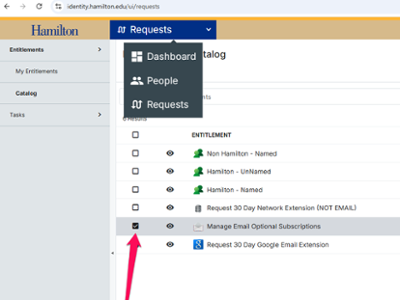
- Select REQUESTS from the top blue drop-down bar.
- Select CATALOG from the left sidebar.
- Select from the available entitlements using the checkmark.
- Click REQUESTS at the bottom.


Available Entitlements
Emails are directed to members of the Class of 2026.
Students belonging to the Class of 2026 are automatically enrolled in this group.
Emails are directed to members of the Class of 2027.
Students belonging to the Class of 2027 are automatically enrolled in this group.
Emails are directed to members of the Class of 2028.
Students belonging to the Class of 2028 are automatically enrolled in this group.
Emails are directed to members of the Class of 2029.
Students belonging to the Class of 2029 are automatically enrolled in this group.
Emails are directed to members of the Hamilton College faculty.
All current faculty, Contributing Retirees, members of Senior Staff, and Directors of academic centers are automatically enrolled in this group. Current faculty members are not allowed to unsubscribe to this list.
Non-Faculty members can request to be added to this list with Dean of Faculty Office approval.
Emails are directed to members of the Hamilton College community.
All current members of the Hamilton College community are automatically added to this group. This includes students, faculty, staff, administrators, and contributing retirees.
Members of this list are not permitted to unsubscribe.
Emails are directed to members of the Hamilton College staff.
All current employees of the college (including staff, administrators, faculty, contributing retirees) are automatically enrolled in this group.
All current employees are not permitted to unsubscribe from this list.
Emails are directed to Hamilton College students.
All currently enrolled students are automatically enrolled in this group.
The FACCUR email list is managed by the Hamilton College identity system.
All Faculty members are automatically added to this list.
Faculty members can request to be unsubscribed from this list by logging in to identity.hamilton.edu > Requests > Catalog > Manage Email Subscriptions
Non-Faculty members can request to be added to this list with approval from the Dean of Faculty Office.
The FACDISC email list is managed by the Hamilton College identity system.
All Faculty members are automatically added to this list.
Faculty members can request to be unsubscribed from this list by logging in to identity.hamilton.edu > Requests > Catalog > Manage Email Subscriptions
Non-Faculty members can request to be added to this list with approval from the Dean of Faculty Office.
Request a sponsored account to be assigned to a Hamilton College named individual with an established relationship with the College. Requires approval.
Request a generic sponsored account to be assigned to a department or other type of sponsored account. Requires approval.
Request a sponsored account to be assigned to a non-Hamilton College individual with an established relationship with the College. Requires approval.
Restricted access to approved requestors.
